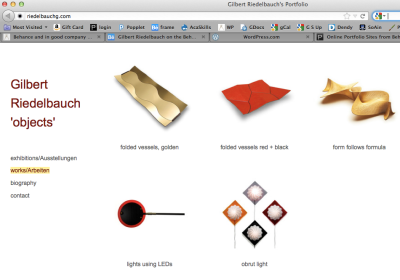
Behance and in good company

A professional looking site to present ones creative works the Behance network is ideal to easily create a portfolio site based on projects that can represent a body of work. Being a web2 service, all one needs to do is create an account on the Behance site and free portfolio pages can be created.

Particular interesting is the option to view your work without any adds,  a URL is provided that can be sent to anyone who might be interested in your work ‘add-free’. Link to my projects.

Add free view of my project gallery

Project gallery on Behance

The projects displays work as gallery pages – the templates are simple and attractive, showing large images and can contain a variety of media.

Behance project page open

project page open

Pixler online image editor 1. Levels, crop and resize

Pixler is a fantastic free image editor showing how powerful online tools have become. Springing to life inside you internet browser t running on both a Mac or PC, all you need is internet access. If you know Photoshop you will find familiar tools in similar places.

You can view YouTube tutorials here.

The following steps illustrate how an image could be improved and resized for online viewing, like an online learning site. The image has a lot to be improved on eg the contrast enhanced (using the Levels tool), cropped  and resized for screen viewing.

This image taken on a cloudy day with out a proper background and lighting serves as a the starting point.

Image to be prepared for screen viewing

Image to be prepared for screen viewing

1.) Open Pixler and the image to be edited.

test image open in Pixler

2.) Enhance contrast. From the ‘Adjustment’ menu select ‘Levels’ use the sliders to set the ‘black and white points’ as well as the balance.

Select 'levels' in the adjustment menu

Select 'levels' in the adjustment menu

levels adjusted, note the change in contrast.

levels adjusted, note the change in contrast.

3.) If needed use the crop tool to ‘frame’ the object in the image.

Crop tool applied to the image

Unwanted parts of the image cropped away

4.) Resize for screen viewing. I recommend to set the image to 1024 pixels wide or 768 high. Please note if the width is 1024 but the hight is more then 768, then adjust the hight to 768 even the resulting width is then less then 1024. An image in portrait format might be 768 pixels high but only a few hundred pixels wide.

Select image size from the 'Image' menu

Select image size from the 'Image' menu

    Image size menu
Image size menu

To save the image, select Save from the ‘File’ menu. I would recommend to change the name of the image to not save over (loose) the original image if  you have adjusted the image size (pixel count).

This is the saved file in full resolution (click to open)

Final image for screen viewing

Final image for screen viewing

You can find out more about Pixlr on its FAQ site. You can also see tutorials on YouTube here.

Soon I will post how to remove the background and add a shadow to the image.

Wall Vessels, 3D object from 2D sheeting

Wall Vessels are a new series of objects formed by combining digital and manual processes. These objects are both utilitarian and decorative and are more then 600mm long and about 450mm wide.


I design the CNC engraving (through 90% of the material thickness) patterns and save them as digital files, these in turn control the CNC router’s path. The machine cut pattern then guides the manual deformation of the sheet into a 3d object. Using composite aluminium panel, this high performing material is lightweight, durable and colourfast, making it suitable for creating lasting individually designed works. Aluminum Composite Panel is best described as a sandwich panel consisting of a Polyethylene core sandwiched between two aluminum sheets with the entire panel consisting of three layers.

I am interested in experimenting with the surface treatment, as the appearance will translate this material from industrial back to the manually formed and finished object.

A paper folded ‘sketch’ object serves as a mock-up. The creases in the paper are translated into a digital vector drawing in Illustrator and saved as .eps file. This file is then used for the CNC router.

craft and design experience in Canberra for Vicki Halper

Below you can find a list of craft & design organisations and individuals relating to the Canberra part of the visit to Australia by Vicki Halper a USA based Smithsonian Senior Fellow.

Robert Foster, Vicki Halper, Gilbert Riedelbauch and Catrina Vignando at GAD

Robert Foster, Vicki Halper, Gilbert Riedelbauch and Catrina Vignando at the Gallery of Australian Design

Her visit was made possible through funding from the Australia Council. Her dense Canberra itinerary reflects the surprisingly active and rich design scene in this city, however one has to know where to look or whom to contact to get a true sense of it.

Her visit coincided with a symposium about Design education at the Australian National University and the ‘City of Design’ talkfest at CraftACT. Vicki’s contribution to both events were very well received and stimulated informed discussions about important contemporary issues in the craft/design field. I am particularly grateful for the time she spend with our design arts students.

Craft Australia, Host organisation

School of Art, Australian National University

The following speakers presented at the ‘DesignPlan ACT‘ a discussion about design education:

National Gallery of Australia

CraftACT - craft and design centre

The following presented at the ‘City of Design’ talkfest at CraftACT:

Canberra Glassworks

  • Ann Jackle, Executive Director,
  • Clare Belfrage, Artistic Director

Gallery of Australian Design

Gallery and Workshop Bilk contemporary jewelery and glass & metal objects

Here are a few links to makers who were mentioned frequently:

and Gallery Metalab, Sydney

I tried my best to put this list together for Vicki. If you think I have forgotten someone she has met or should know, please let me know.

It was a great pleasure to meet and get to know Vicki during her stay in Canberra.

CAD to gold-plated stainless steel

Web-based fabrication has gotten even more exciting with a new material/process offered through the Ponoko system. Getting computer models ‘printed’ in 3D using online rapid prototyping processes is established but having the CAD parts arrive in stainless steel with a gorgeous rich gold coat is quite something.

ponoko stainless steel gold-plated parts

This new material/process is offered through the US hub and is equally as easy to order as the 2d laser-cutting service. I found that dimensions ‘shrink’ slightly eg holes I had modeled as 3.9 mm turned out to be 3.4 mm in the finished parts. Being mostly stainless steel (with some bronze wicked into it) it proved very difficult to drill the holes to the right size. High speed drill bits (even titanium tipped) are blunt after drilling only 6mm deep. Reducing the speed from the recommended 1000 rpm to a third helped to improve their staying power slightly. I look forward to the carbon-nitride drill bit I ordered to finally finish the job.

These parts are for a new light using a mix of digitally fabricated and manually made elements. The ‘gold’ parts are intented to connect carbon fiber rods forming the main structure of the design.

design sketch and wire model

2010 in review

WordPress.com mulled over how this blog did in 2010, and here’s a high level summary of its overall blog health:

Healthy blog!

The Blog-Health-o-Meter™ reads Wow.

Crunchy numbers

Featured image

In 2010, there were 6 new posts, growing the total archive of this blog to 35 posts. There were 16 pictures uploaded, taking up a total of 2mb. That’s about a picture per month.

The busiest day of the year was December 8th with 328 views. The most popular post that day was True digital art on iPad by David Hockney.

Where did they come from?

The top referring sites in 2010 were ifreestores.com, flickr.com, wer-weiss-was.de, uclue.com, and soa.anu.edu.au.

Some visitors came searching, mostly for albrecht dürer, albrecht durer, dürer, david hockney ipad, and duerer.

Attractions in 2010

These are the posts and pages that got the most views in 2010.

1

True digital art on iPad by David Hockney October 2010
4 comments

2

Ist Albrecht Dürer ein Fehler unterlaufen? Eine überraschende Entdeckung in seinem Holzschnitt ‘Der Zeichner der Laute’ June 2007
5 comments

3

Did Albrecht Duerer get it wrong? A surprise discovery in one of his prints. May 2007
16 comments

4

Further to Albrecht Dürer’s 1525 woodcut ‘Man drawing a Lute’ (The Draughtsman of the Lute) June 2007
3 comments

5

Production of exhibition catalogue made easy June 2009
6 comments

A post about a post

What goes round, comes round. I was surprised to find my post ‘True digital art on iPad by David Hockney‘ almost word for word as well as image for image re-posted and littered with advertising by ‘theproductjudge’. As this post was intended as a thank-you to David Hockney’s for his generosity, I am frustrated by this syndication, code for rip-off. Frustratingly they even ripped-off my title and achieved swiftly a much higher Google ranking.

David Hockney iPad drawings

David Hockney iPad drawings

However, my blog stats  suddenly increased as one of my images showing David Hockney’s drawings on iPads has gone up in Google’s ranking – number 4 if one searched ‘David Hockney iPad’ – due to this appropriation.

David Hockney iPad google hit 4th image

4th image on Google for David Hockney iPad

Similar to this but legit: Martyn Gayford wrote online about Hockney’s current exhibition of iPad drawings in Paris, days later this text was printed – ink on paper – in the ‘Canberra Times’ including the image of me with the iPads taken at an earlier event at ANU School of Art.

So, what ever is available can reappear in many forms. I just would have liked to been asked before someone uses my words and images (intellectual property) and tries to make a commercial gain.

Prezi, or no more powerpoint for me!

Recently I came across ‘Prezi’, a non-linear presentation tool. I am totally impressed by this simple and fun-to-use online software.
Its  easy to organise and present text, images and video’s in a fluent way that can convey complex topics.

'Home' view of Hockney 'Prezi'

One can ‘zoom’ to any point of the presentation and back without  a sense of breaking the presentation. I enjoyed its smooth moves and flexibility for this presentation about iPad drawings by David Hockney (link to post about these iPad drawings).

The only improvement I would like to suggest is better text editing eg more font options.

Best to check out Prezi for yourself here.

True digital art on iPad by David Hockney

This post is to thank David Hockney for making available two of his recent iPad drawings to my teaching program at the School of Art at the Australian National University.

David Hockney iPad drawings

David Hockney iPad drawings

We celebrated these impressive drawings, which are in every sense true digital art works, as part of Core Computer Studies lecture to our 1st year students and guests. I decided to display these works on two Apple iPads, the very platform/media they were created on.

Lelde, Gordon Bull (Head of School) and I

David Hockney drew them during his stay at Glyndebourne, a 700-year old country house and opera house in East Sussex, England. There he recreated the stage-set for the opera ‘The Rake’s Progress’ by Stravinsky . Looking closely at these drawings  one gets a sense of this location.  The drawings titled: ‘iPad 6 8 2010’ & ‘iPad 7 8 2010’ were sent as email attachments on 21 August 2010.

With David Hockney iPad drawings, photo Karleen Minney

With David Hockney iPad drawings, photo Karleen Minney

I like to thank Martin Gayford, critic for Bloomberg News, for kindly forwarding my emails to David Hockney. I also like to thank Tristan Peemoeller from MAC1, Greg Aldridge and Barbara McConchie for their support, to make the presentation of these works possible.

This event was picked up by the news, please read more here.

All you can do with materials

‘One can do only four things with material’, is my current theory I like to test with this post. Four steps apply to the majority of making processes and some aspects of these are shifting from the makers workbench to distributed digital fabrication online.

It is worthwhile to look at these shifts in more detail as the mastery of digital technologies is involved in defining contemporary craft practitioners as ‘Designer Makers’.

The four processes are:

Cutting – Forming – Fusing - Finishing

About these categories:

Many materials used by makers are available in flat, like sheet metal, fabric, glass. Traditional cutting tools such as saws, scissors, blades are used on them, while at the same time digitally controlled cutting processes like laser & water-jet cutting or CNC plasma cutting are becoming more and more accessible. Digital processes influence most significantly the first category, cutting. Just about all flat materials can be ‘fashioned’ this way, allowing the maker to achieve repeatable precision parts countless times. These technologies are still very specialised and expensive usually out of reach of the individual maker. However a growing fabber network will bring these tools closer to the workshop of the individual maker.

The forming is still mostly in the hands of the crafts practitioner with digital 3 dimensional processes only on the periphery and used in niche applications. Once cut to size, many materials are traditionally formed through impact like the use of hammers or with the help of heat, steam or formed into and over molds. Rabid prototyping is a representing the digital fabrication for this category. For example in contemporary jewelery very detailed 3D wax or polymer prints are used to achieve -  once cast in metal – very unique results.

The third category, fusing, relies heavily on the skilled work of the maker and no influence of any digital technology in this category is evident. All crafts have developed processes of combining materials either two of the same kind or as a mix of different materials. Some are permanent while others can be separated again. These fusing processes include welding, gluing, riveting, stitching, bolting.

Finishing: the treatment of the works surface is typically one of the last steps in the making process, while adding significant value to the finished object, it is time consuming.  Many of the finishing processes are completed by hand. However an increasing number of digital and computer controlled processes are relevant to this category such as digital printing on fabric, laser engraving. Some of the finishing processes are mechanical or chemical and can include techniques such as engraving, polishing, printing, anodizing, lacquering.

Digital fabrication has without doubt much to offer for contemporary craft practice and over time will get more important for the contemporary designer maker. By becoming more accessible digital fabrication has the potential to contribute significantly across the entire making processes.

To integrate these technologies with traditional tools the maker has to add the required digital skills to the tool set as well. Just about all cutting processes I mentioned are based on the ability to generate vector based drawings. These would require a basic knowledge of a software such as Illustrator.

To address rapid prototyping processes, one has to master a CAD program first. Typically this requires a much steeper learning curve until one is able to create a well-formed 3D computer model. However non of these skills can’t be learned (or taught for that matter).

Together with an increasingly fast, accessible internet and more user friendly web 2 services, digital fabrication is ready to be explored creatively.

Next Page »


Follow

Get every new post delivered to your Inbox.